


Parent How-To Videos
MyPowerHUB is our official parent portal and communication platform.
Schoology is no longer used for communication or parent groups.
MyPowerHUB
Overview
MyPowerHUB
Account Access
MyPowerHUB
Parent-Teacher Communication
Original Parent Portal
Overview
Schoology
Parent Overview
School Dismissal Manager
Overview (Central Only)
Beginning of Year Documents
How to Complete
PowerSchool - SIS
Provident Charter School uses PowerSchool products.
- PowerSchool SIS is our Student Information System (SIS)
- Schoology is our Learning Management System (LMS)
- MyPowerHUB is our Parent Communication Platform
- Enrollment is our unified application, enrollment, lottery, and registration platform.

MyPowerHUB – Parent Portal
MyPowerHUB serves as the new parent portal. It brings together student information and communication tools into one convenient place.
- Watch overview video: youtube.com/watch?v=lS6BjQDcbPA
- Newsfeed – replacing Schoology Parent Groups
- The Newsfeed will automatically update with all communication from your student’s teachers and be immediately accessible in your portal.
- Schoology will only be used for accessing content and materials attached to student assignments.
- The mobile app will automatically update to reflect MyPowerHUB.
Accessing MyPowerHUB
1. Navigate to the website: https://providentcs.guardian.powerschool.com/
2. Log into your Parent Portal account.
3. You will be taken directly to MyPowerHUB.
– The original parent portal is still accessible using https://providentcs.powerschool.com/public/home.html
Schoology – Learning Management System (LMS)
Parent access to Schoology is optional as grades sync to the Parent Portal. Only attached assignment materials in Schoology, such as PDF worksheets, do not sync to the Parent Portal. Please reach out to the Technology Department at 412-709-5160 ext 147 with any issues accessing Schoology.
Accessing Schoology
1. You will receive a welcome email with a URL
– Contact the Technology Department if you did not receive this email
2. Click on the URL to update your password
3. You can now view your student and their courses/assignments.
– Do not send communication through Schoology. MyPowerHUB is the official communication platform for parent-teacher communication.

Beginning of Year (BOY) Documents
Annually we send out our policies for you to review and make updates. We will send these via Google Forms for ease of access and signing off. Should we not receive a signature, the response we received during registration will continue to be used.
1. PCS will send an email to all contacts with the BOY documents and policies .
2. Review each policy and document, make the appropriate selections, and then sign off on the form.
– Only 1 contact per student needs to sign off on the form.
– Should the form not be submitted, the submitted data from registration will be used for the current school year.
~ New policies not previously included during registration may require a signature and submission, in which case we may reach out differently than the above.
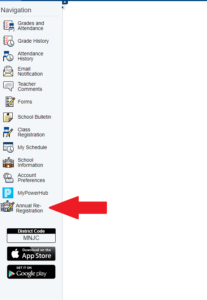
Parent Portal Annual Re-Registration
How to review and update contacts & health Information at the beginning of the school year.
- Through your PowerSchool Parent Portal, you will have access to ‘Annual Re-Registration’ which provides the contact information and health information we have on file for your student(s).
- You will be able to make edits and submit changes during the Re-Registration period at the start of the school year.
- No submission is necessary if you do not have any changes to make.
- This is accessible through both the original Parent Portal (screenshot) & MyPowerHUB.
Mobile Apps
PowerSchool Mobile App
Video on How to use the app (original)
Video on How to use the app (MyPowerHUB)
District Code: MNJC
Resources
PCS Central Back to School Information Night (8/4/2026)
PCS West Back to School Information Night (8/10/2026)
PCS Town Hall Meeting (8/10/2026)
PCS Town Hall Meeting (7/20/2026)
Uniforms
Provident Charter School will have a uniform scholar dress code in order to provide an environment where the focus is on learning and the distractions of dress are kept to a minimum. All scholars are expected to be properly dressed in the school uniform every day. All parents and guardians are expected to support their children by ensuring that scholars are properly dressed when they leave for school each morning.
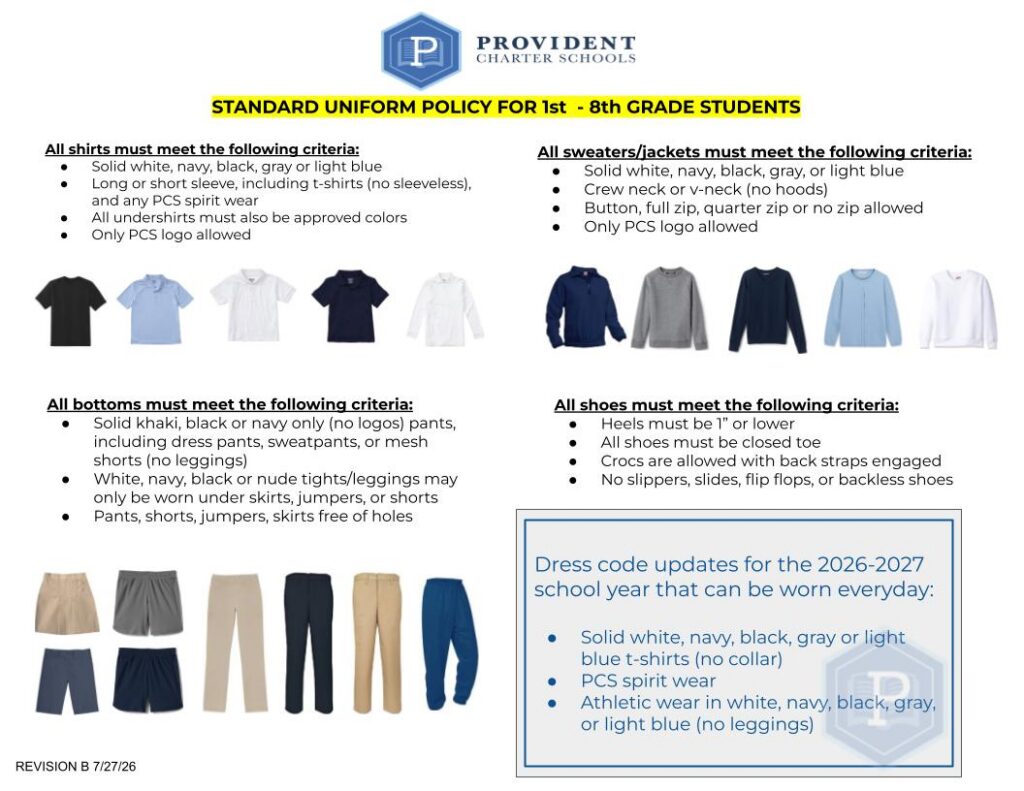
PCS Central Apparel Store
Order spirit wear using the following link! PCS families, please remember that the uniform policy applies while students are in school. Any spirit wear items outside of the policy (e.g., hoodies) would need to be removed during school hours!
https://provident-charter.itemorder.com/shop/home/
PCS West Apparel Store
Order West apparel using the following link! PCS families, please remember that the uniform policy applies while students are in school. Any spirit wear items outside of the policy (e.g., hoodies) would need to be removed during school hours!